


Pocket - AI Personal Assistant
4.8225.00 Reviews
App Specs
- Version
- 0.6.76
- Updated On
- License
- Free
- Downloads
- 50,000+
- Developer
- OpenVisionEngineering
- Categories
- Productivity
- Platform
- Android
Screenshots
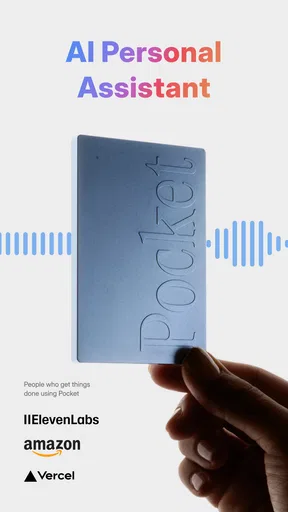
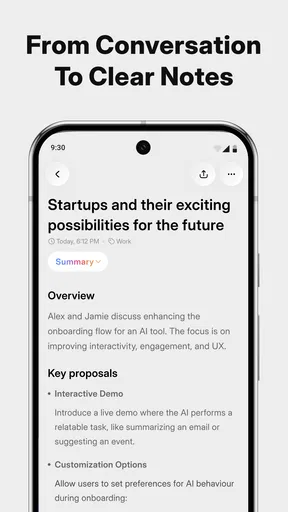
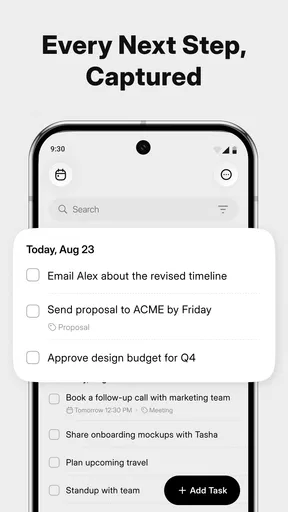
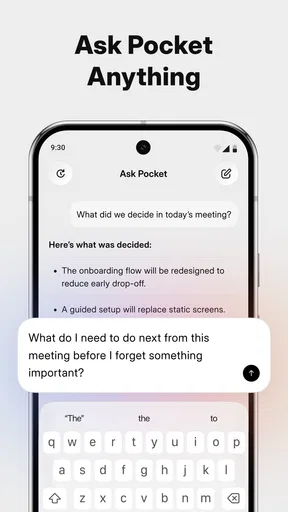
 Analysis by AppCompare
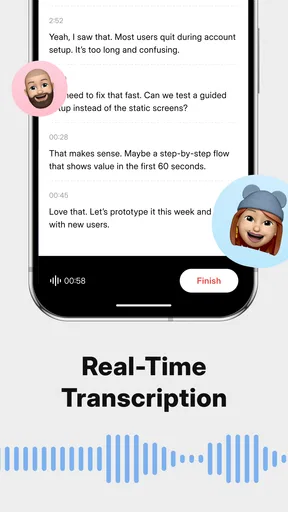
I tried Pocket - AI Personal Assistant as a productivity app for the moments when a meeting, idea, or spoken note needs to become something useful afterward. Its appeal is easy to understand: instead of relying on memory, scattered notes, and a separate transcription service, it aims to keep the conversation and the resulting action items together. I found that approach more valuable than the simple “AI assistant” label suggests, especially when my attention was divided between listening and participating.
Developed by OpenVisionEngineering, Pocket is free to install and is suitable for Everyone. It has reached a 4.8 average from around 2.1 thousand ratings, with more than 50 thousand installs, which gives it a reassuring early signal without making it feel like an established, all-purpose office suite. The current version is 0.6.76, and it runs on Android 7.0 or later. That broad system support is useful for people who keep an older phone, although the experience naturally depends on how much processing and battery headroom the device has.
How Pocket feels when the day gets busy
When my day gets crowded, I find the useful question is not how much Pocket can capture, but what I want to do with that capture afterward. A quick label or a clear next step can make a note far easier to revisit than a pile of unreviewed transcripts. That practical habit also helps me judge whether its free access is enough for my routine or whether paid options could be worthwhile.
Fast enough for capturing thoughts before they disappear
The first thing I noticed was that Pocket makes sense as a capture tool rather than as a place to perform a long setup routine. When an idea arrives between tasks, the value is in getting it recorded quickly and returning to work. A personal assistant that requires several screens before recording loses much of its purpose, so I paid attention to that transition more than to decorative interface details.
For short voice notes, the practical expectation is straightforward: open the app, speak naturally, and let the transcript become a starting point for later organization. I would not treat the first result as a polished document. Transcription is most useful when I review names, numbers, technical terms, and sentences that contain several actions. Pocket can reduce the amount of typing, but it does not remove the need for a quick human check.
That distinction matters because a transcript and a useful task list are not the same thing. A transcript preserves what was said; an action item should clarify who needs to do what and, ideally, by when. Pocket’s focus on both ideas and action items makes it more interesting than a basic voice recorder, but I still recommend treating generated tasks as drafts. The best workflow is to correct them immediately while the conversation is fresh.
The real speed advantage is reduced mental switching. I do not have to listen, remember a request, stop to format a note, and then return to the discussion. That is particularly helpful for one-to-one conversations, planning sessions, and quick idea dumps. The app is less valuable when I already have a disciplined note-taking system and can capture the same information with a few keyboard shortcuts.
Worth Reading Before You Choose

EA SPORTS FC Mobile 26 Is a Bigger Football Game, but It Takes Time

Flipboard Shows What News Apps Must Do Beyond the Feed

Switching to Android Auto Means Rethinking Your Driving Routine

Google Calendar Makes a Crowded Week Easier to Manage

Ludo King Makes the Most of the Minutes Between Plans

Baby Panda World Brings Quick Play to Modern Phones, but Its Game Library Feels Busy
What happens during longer meetings and heavier sessions
Pocket becomes more demanding when the material is longer or when I expect a detailed, reliable record. A brief thought is easy to judge: if a word is wrong, I can fix it immediately. A lengthy discussion creates more opportunities for unclear speech, overlapping voices, background noise, and context that an automated summary may interpret imperfectly. I would therefore use it as a meeting aid, not as the sole official record of an important decision.
For a regular meeting, I would begin with a simple routine. Before the discussion starts, I would decide what outcome I need: a concise recap, a list of assigned work, or a searchable record of ideas. That small decision prevents me from expecting one output to serve every purpose. Afterward, I would scan the transcript for decisions and turn vague phrases such as “we should look at this” into clear personal notes before sharing anything.
A useful, less obvious workflow is to capture the informal conversation and then write a short confirmation from it. For example, after discussing a project change, I could use the transcript to reconstruct the decisions, check the names and dates myself, and send a clean summary separately. This uses Pocket for memory support without pretending that an automatically produced result is ready for external distribution.
Heavy use also changes the resource question. Any app that records or processes spoken material can place more pressure on the phone than a simple checklist. I would avoid beginning an important session with a nearly empty battery or while the device is already struggling with many demanding apps. That is not a measured claim about Pocket’s consumption; it is sensible preparation for a workload involving audio, transcription, and AI processing.
On a newer phone, I would expect the experience to feel more comfortable during repeated captures. On an older Android device, the same workflow may feel less relaxed if storage, memory, or battery capacity is limited. Since the minimum system requirement is Android 7.0, compatibility is generous, but compatibility alone does not guarantee identical performance across every supported phone.
Stability, interruptions, and recovering from a disrupted session
Reliability is more important here than visual polish. A productivity app can be forgiven for having a plain interface; it is much harder to forgive losing the thought or meeting it was meant to preserve. My advice is to build a recovery habit around Pocket instead of assuming every recording will be enough on its own. For an important conversation, keep a tiny manual note with the meeting title, key decisions, and any names that must be exact.
That backup is not an argument against using the app. It is a sensible division of responsibility. Pocket can handle the burden of capturing detail, while I retain control over facts that matter. If an interruption occurs, the manual note gives me an anchor for reconstructing the missing part. If the transcript contains a doubtful phrase, the same note helps me identify what needs checking rather than rereading everything.
I would also process a long meeting in stages when possible. A short review after each major topic is easier than facing one large block of text at the end of the day. This approach has another benefit: it exposes mistakes while the people, decisions, and context are still easy to remember. It turns Pocket from a passive archive into a small review system.
Users who need a legally dependable, word-for-word record should be cautious. An AI transcript can be extremely convenient and still be unsuitable as the only evidence for contracts, compliance work, medical details, or sensitive decisions. In those situations, I would use an approved recording and documentation process, then treat Pocket as an aid for organizing personal follow-up rather than as the authoritative source.
Older phones, storage pressure, and practical device limits
The Android 7.0 minimum makes Pocket accessible to a wide range of devices, but older hardware deserves realistic expectations. A phone that handles messaging and ordinary notes comfortably may still feel less capable when asked to record, process, and present a substantial transcript. I would test it with a low-stakes voice note first, then try a longer session before depending on it for work.
Storage is another everyday consideration. Transcripts are usually lighter than audio, but a workflow based on repeated meetings can still create a growing collection of material. I would regularly remove or archive notes that no longer serve a purpose, particularly if the app keeps more than the final text. The important point is to decide what I need to retain before my phone becomes a crowded filing cabinet.
Battery planning is equally simple. For a quick idea, it is unlikely to change how I use the phone. For a long meeting, I would start with a comfortable charge, close unrelated demanding tasks, and keep the device in a position where the microphone can pick up speech clearly. Better placement can improve the usefulness of the result without requiring any advanced setting.
There is also a privacy and etiquette layer to this kind of tool. Before capturing a group conversation, I would tell the participants and follow the rules that apply to the situation. Pocket’s usefulness does not remove the responsibility to handle other people’s words carefully. For personal brainstorming, that concern is simpler; for workplace or client discussions, it should be part of the decision to use any transcription assistant.
Where it beats ordinary notes, and where it does not
Compared with a standard notes app, Pocket is strongest when the information already exists in speech. A notes app gives me precise control and makes quick edits easy, but it expects me to type or summarize while listening. Pocket can preserve more of the original conversation and help me identify follow-up work afterward. That is a meaningful advantage for people who think aloud or who lose details while trying to write everything down.
Compared with a basic voice recorder, it offers a more useful route from audio to text and tasks. A recorder preserves sound, but I still have to replay it and create structure manually. Pocket is designed around the part that comes next: understanding the material well enough to revisit ideas and act on them. The trade-off is that an audio file is a direct source, while an AI-generated interpretation needs checking.
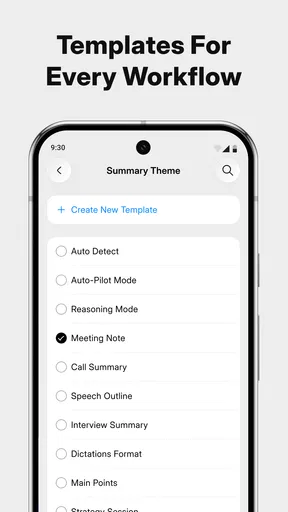
Compared with a dedicated meeting-notes platform, Pocket may be more appealing to an individual who wants a lightweight assistant rather than a shared team workspace. A specialized business tool can be a better choice when several people need permissions, formal templates, integrations, or a controlled record. Pocket makes more sense when the main problem is personal capture and follow-through.
The pricing also deserves a careful look. The app is free to install, while in-app purchases range from $19.99 to $239.99 per item. I would begin with the free experience and judge how often I actually use transcription and action-item support before considering a paid purchase. Someone who records only an occasional idea may not receive enough daily value to justify a higher-cost option, whereas a person who handles frequent meetings could view the time saved as the main benefit.
Three workflows that make the app more useful
My favorite use is the “capture, correct, commit” routine. I capture the discussion without trying to write a perfect summary, correct the important transcript details soon afterward, and commit only the genuine next steps to my task system. This avoids two common failures: keeping a huge transcript that I never revisit, or trusting a rough AI task list without checking it.
A second workflow is an idea backlog for creative work. Instead of forcing every thought into a polished note, I would speak the problem, the possible solution, and the next experiment. Later, I can review those entries together and identify patterns. The benefit is not merely transcription; it is preserving the original reasoning before it gets flattened into a short conclusion.
A third workflow is preparation for a follow-up call. I would review earlier captured ideas, record a short spoken agenda, and use the resulting notes to make sure the conversation ends with explicit responsibilities. This is a practical way to prevent “we discussed it” from becoming “nobody knows what happens next.” It also shows where Pocket is not enough: I still have to make the decision and communicate it clearly.
For students, freelancers, and solo professionals, those workflows can be more valuable than an elaborate project-management system. For a large team that needs shared ownership and formal accountability, I would choose a tool built around collaboration first and use Pocket only for personal preparation or memory support.
Who should use Pocket, and who should skip it
I would recommend it to people who regularly move between conversations and action lists, especially those who find handwritten notes incomplete or distracting. It is also a good fit for anyone who collects spoken ideas while walking, commuting, or working away from a keyboard. The app’s focus on transcripts and follow-up makes it more practical than an assistant that only answers isolated questions.
I would be more cautious if you dislike reviewing AI output. Pocket does not eliminate judgment; it changes where that judgment happens. Instead of composing every note from scratch, you inspect a generated record and correct what matters. That is a good trade for many users, but not for someone who wants every line to be manually controlled from the beginning.
I would also skip it as a primary solution if your work depends on strict organizational controls, formal shared records, or guaranteed verbatim documentation. A conventional note system may be better for precise manual writing, and a dedicated meeting platform may be better for structured team processes. Pocket is most convincing in the middle ground between a recorder and a full collaboration suite.
My performance verdict after weighing convenience against control
Pocket feels like a focused productivity companion rather than a complete replacement for notes, calendars, or task managers. Its strongest quality is the bridge it creates between spoken information and useful follow-up. I can imagine opening it for a quick idea, using it to reduce the burden of meeting notes, and returning later to turn conversation into a small set of clear actions.
Its limitations are tied to the same technology that makes it attractive. Longer or noisier sessions need more checking, demanding workloads deserve sensible battery and device preparation, and important records should not depend on an unverified AI interpretation. Those are not reasons to dismiss it; they are boundaries that keep the convenience honest.
At version 0.6.76, I see a promising tool for personal productivity, particularly for users who want less typing and better follow-through. The free entry point makes experimentation easy, while the optional purchases mean frequent users should evaluate the value of their own routine rather than assume the most expensive option is necessary. My recommendation is to start with small, low-risk captures, develop a review habit, and expand only when the workflow genuinely saves you time.
Overall, I would recommend Pocket - AI Personal Assistant to a friend who often leaves meetings with good intentions but incomplete notes. I would not present it as a flawless secretary or an official record keeper. Used with that realistic expectation, it can make everyday information easier to catch, revisit, and turn into action—without forcing me to stop participating every time an idea is worth remembering.
Pros
- Natural voice conversations make hands-free tasks feel convenient.
- Can help draft messages
- emails
- notes
- and other everyday content.
- Useful for brainstorming
- summarizing
- and organizing personal ideas.
- Personalized responses improve when the assistant learns your preferences.
- Quick answers can reduce the need to search across multiple apps.
Cons
- AI responses may occasionally be inaccurate or confidently misleading.
- Some features may require a subscription or have usage limitations.
- Sensitive conversations raise privacy concerns for some users.
- Voice recognition can struggle with accents
- noise
- or unclear speech.
- Requires a reliable internet connection for most assistant functions.
FAQs for Pocket - AI Personal Assistant
What is Pocket - AI Personal Assistant and what can it do?
Pocket - AI Personal Assistant is designed to provide conversational help through artificial intelligence on a mobile device. Depending on the available version and features, it may assist with answering questions, generating ideas, summarizing information, writing or rewriting text, planning tasks, and offering general recommendations. It is best viewed as a convenient productivity and information tool rather than a replacement for professional advice or human judgment.
Does Pocket - AI Personal Assistant require an internet connection?
Most AI assistants need an active internet connection because requests are processed through online servers rather than entirely on the phone. Without reliable Wi-Fi or mobile data, responses may be delayed, unavailable, or limited. Users should also consider data usage when sending longer prompts or using the assistant frequently. Check the app’s current store listing for any offline functions, connection requirements, or regional availability differences.
Is Pocket - AI Personal Assistant free to download and use?
The application may be available to download at no initial cost, but some capabilities can depend on subscriptions, credits, usage limits, or in-app purchases. Premium access may unlock faster responses, higher limits, additional AI models, or extra productivity features. Before confirming a purchase, review the pricing page, billing period, trial conditions, and cancellation instructions because offers and available plans can change over time.
Can I trust the answers provided by Pocket - AI Personal Assistant?
AI-generated responses can be useful, but they are not guaranteed to be accurate, current, or free from mistakes. The assistant may misunderstand a question, invent details, or provide incomplete information, especially when a request is ambiguous or concerns recent events. Always verify important facts using reliable sources, and do not rely on the app alone for medical, legal, financial, safety, or other high-consequence decisions.
Is my personal information safe when using Pocket - AI Personal Assistant?
Before using the assistant for private matters, read its privacy policy and review the permissions requested on your Android or iOS device. Prompts, uploaded files, account details, or conversation history may be collected, stored, or processed according to the provider’s practices. Avoid entering passwords, payment details, identity documents, confidential work information, or sensitive personal data unless you clearly understand how that information is handled.


